Job Experience Filter
The Job Experience filter in Ocean.io allows you to find contacts based on keywords or phrases found in their LinkedIn job descriptions. Instead of relying only on job titles, you can search what people actually do in their roles.
Updated November 24, 2026
What the Job Experience Filter Does
This filter lets you:
- Search for keywords or phrases in job descriptions
- Find people based on real responsibilities and experience
- Use multiple keywords at the same time (comma-separated)
- Exclude specific keywords if needed
- Search across LinkedIn job data
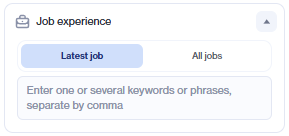
🔍 How It Works
You can enter:
- One keyword →
salesforce - Multiple keywords →
salesforce, outbound, SDR - Phrases →
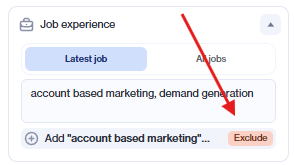
account based marketing, demand generation
The filter will return contacts whose job descriptions contain those terms.
🚫 How to exclude keywords in the Job Experience filter
After entering a keyword, you can exclude it directly from the filter UI:
- Type your keywords in the filter
- Hover over the keyword after typing or pasting it
- Click the “Exclude” button instead of the enter button to add it
The system will then remove profiles that contain that keyword in their LinkedIn profile descriptions.
⚙️ Filter Modes
You can choose between two search modes:
🟡 Latest Job
- Searches only the person’s most recent job description
- Best for understanding what they are doing right now
🔵 All Jobs
- Searches across all past job descriptions
- Useful for finding any historical experience
Use Cases
🎯 1. Find people with specific skills or experience
Search for keywords like:
cold outreachpipeline generationgrowth marketing
👉 Useful for building highly targeted outbound lists.
🧰 2. Target users of specific tools
Search for:
HubSpotSalesforceMarketo
👉 Identify people with hands-on experience using relevant tools.
🏢 3. Improve ICP targeting beyond job titles
Instead of relying on titles like “Marketing Manager,” search for actual work:
SEOcontent strategypaid advertising
👉 Helps find the right people even when titles are vague or inconsistent.
✨ Pro tip
For best results, combine this filter with:
- Skills filter → to confirm capabilities
- Profile Description filter → to understand intent and positioning
This helps you move from:
**“they might have done it” → “they have the skill” → “they actively use it in their work”**